Power Apps · Power Automate · Dataverse

Don't let absent
approvers stall
your processes

When an approver goes on holiday, gets sick, or leaves the company, your carefully built flows grind to a halt. The task delegation app gives you full visibility over every open approval — and lets you reassign any of them in seconds.

Power Apps  |  LPA Approval Task Delegation
v1.2
Assignee ▾ 7+ days ▾
Task Assignee Requestor Age Action
#REQ-0008 Approval required Tomáš Říha Dev Account 8d
#REQ-0005 Manager approval Jana Novák OOO Finance 15d
#REQ-0003 Purchase request Jana Novák OOO Marketing 21d
#REQ-0001 Approval required Petra Svoboda HR Team 5d
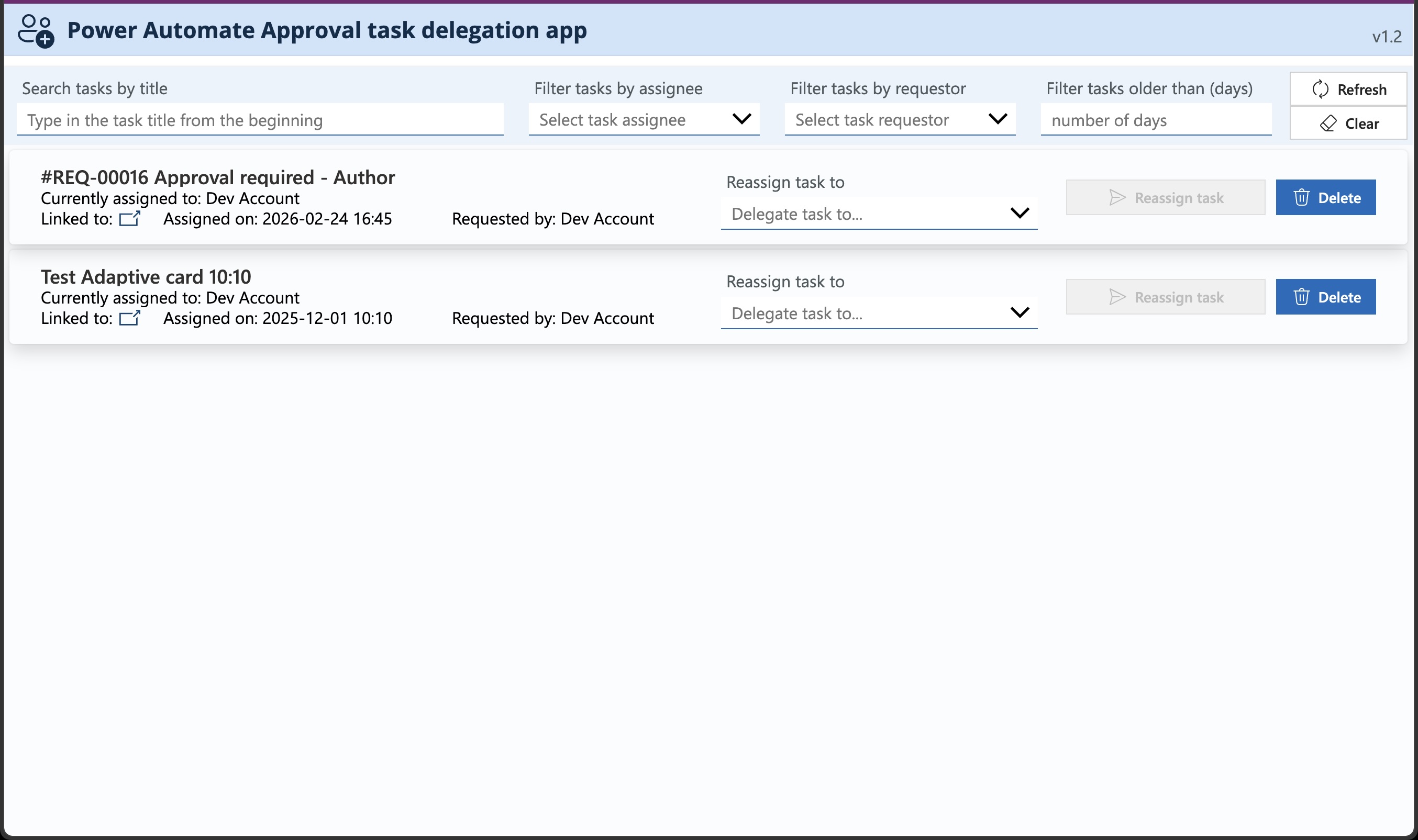
The Power Automate Approval task delegation app showing all open tasks with assignee, requestor, age, and delegation controls
🏢Used across multiple organisations
Delegate any task in seconds
🔒Runs in your tenant — nothing leaves your org
🔔3 notification channels — email, Teams card, task
Free lifetime updates

One missing approver
shouldn't stop everything

You built the perfect process. Requests come in, flow through the right people, get approved — usually. But then someone goes on holiday, gets sick, or leaves the company while a task is waiting. The process stops dead.

"The process can't wait until the holiday is over!"

Even if you suspect something is stuck, there's no standard way to see it. No tool to reassign it. The only person who can delegate the task is the approver who's currently unreachable.

  • ?How do you find out a task has been waiting for two weeks?
  • ?What do you do when the approver is on a three-week vacation?
  • ?Can you see all open tasks across the entire environment?
  • ?How do you reassign without restarting the whole flow?
  • ?Does the new approver actually know they now own the task?
  • ?Can you move all tasks from one person to another at once?
  • ?What happens to permissions on the linked item after reassignment?
  • The Task Delegation App handles all of this.

Full control over every
approval task, always

Not a workaround. A purpose-built Power Apps solution that gives you complete visibility and delegation capability across your entire Power Platform environment.

01

Complete task overview

See every open approval task across your Power Platform environment in one place — who owns it, who requested it, and how long it has been waiting.

02

Powerful filtering

Search by task title, assignee, requestor, or age. Instantly surface tasks that are overdue or stuck with an absent approver — no scrolling through everything.

03

Single-click delegation

Reassign any task to any user in seconds. No editing flows, no Dataverse tables, no admin portal — select the new approver and confirm.

04

Batch delegation

Move all open tasks from one user to another in a single operation. Indispensable when an approver leaves the company or is out for an extended period.

05

Three-way notifications

The new approver is alerted via email, a Teams adaptive card, and a Teams task follow-up — three channels to make sure the task doesn't get missed again.

06

Permissions & roles handled

The reassignment flow doesn't just transfer the task — it also updates SharePoint permissions and roles on the linked item, so the new approver can actually act on it.
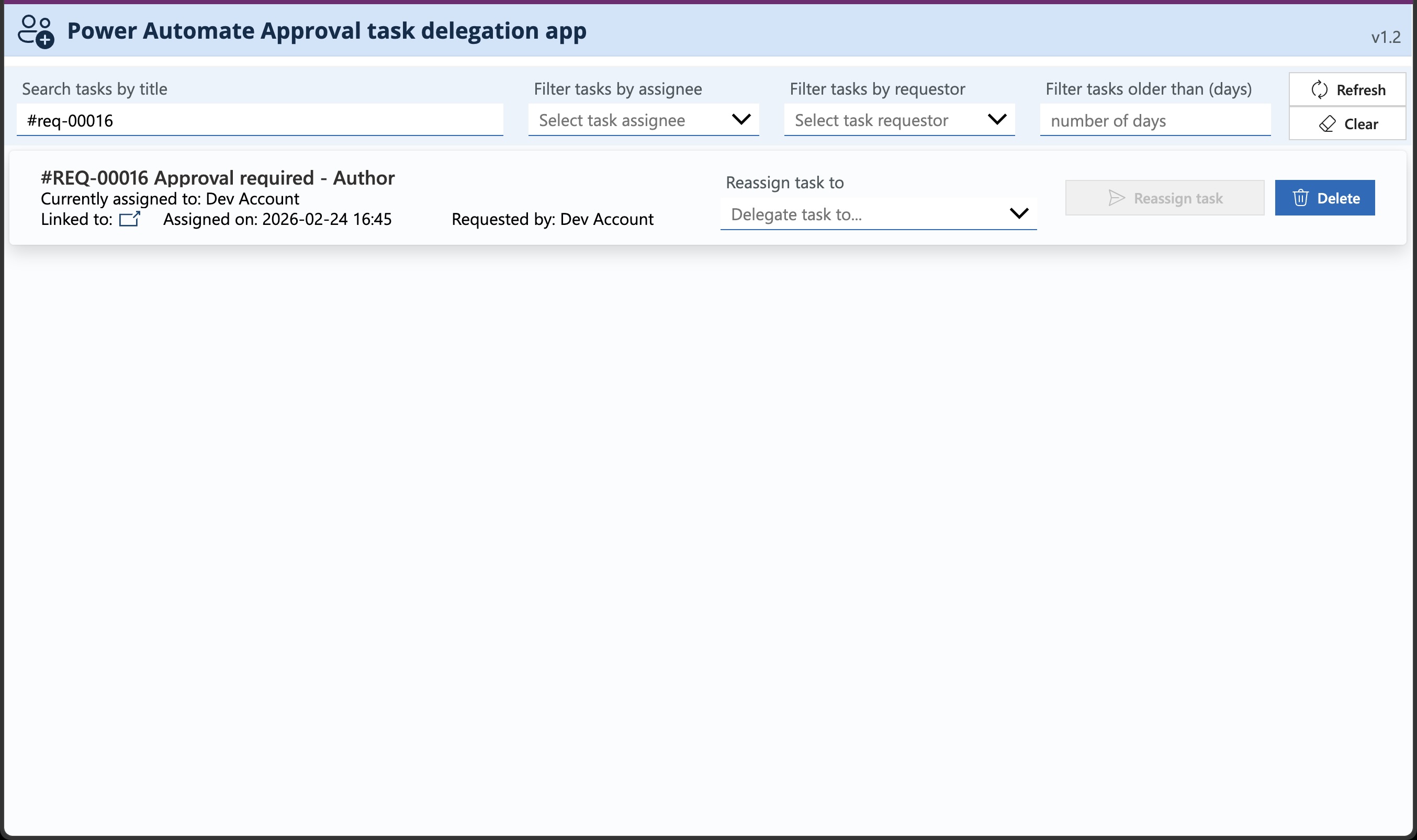
App with search by title active — filtering tasks to a single result by typing part of the task name
Search & filter
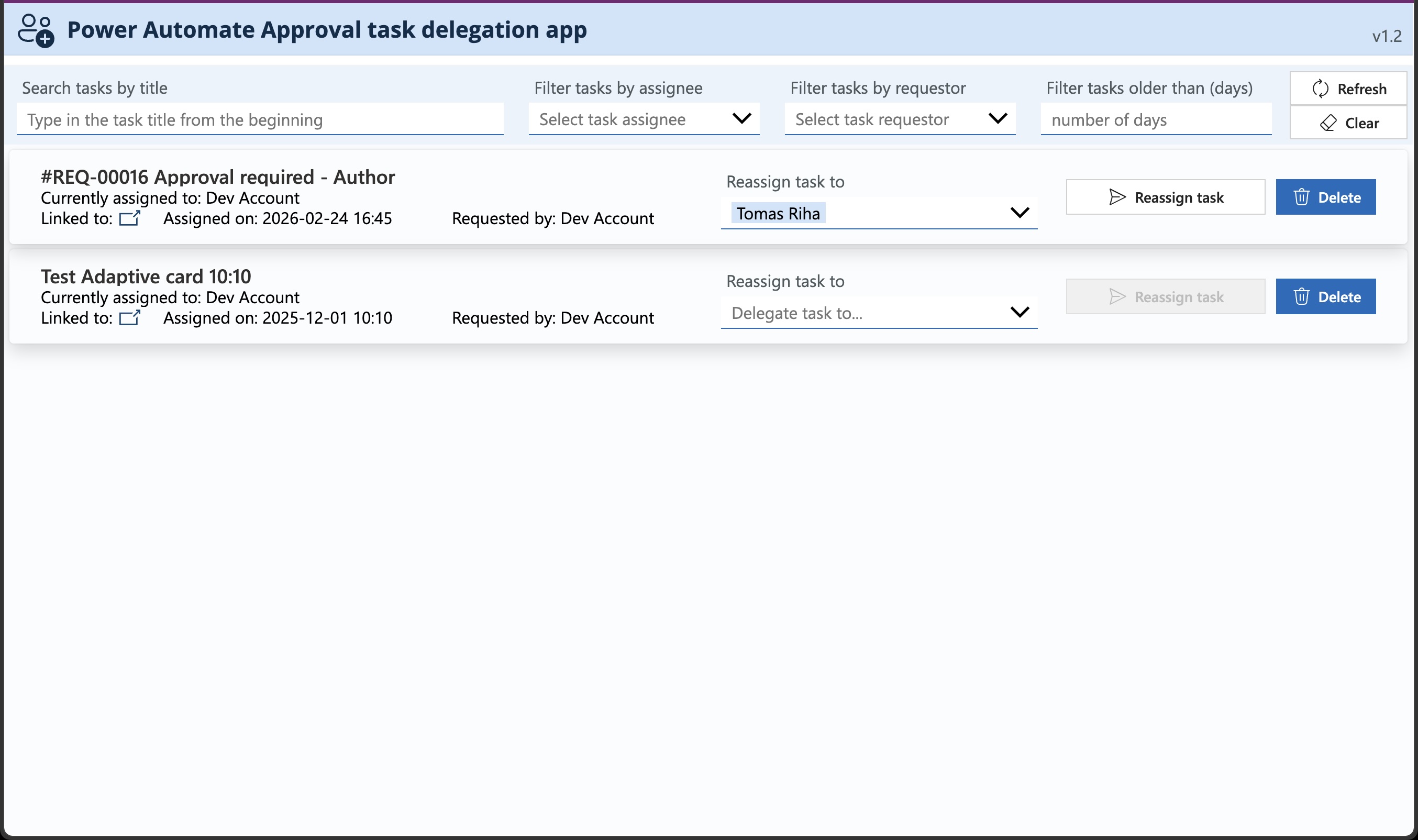
Single task selected with Tomas Riha chosen in the delegate-to dropdown and Reassign task button active
Single-task reassignment
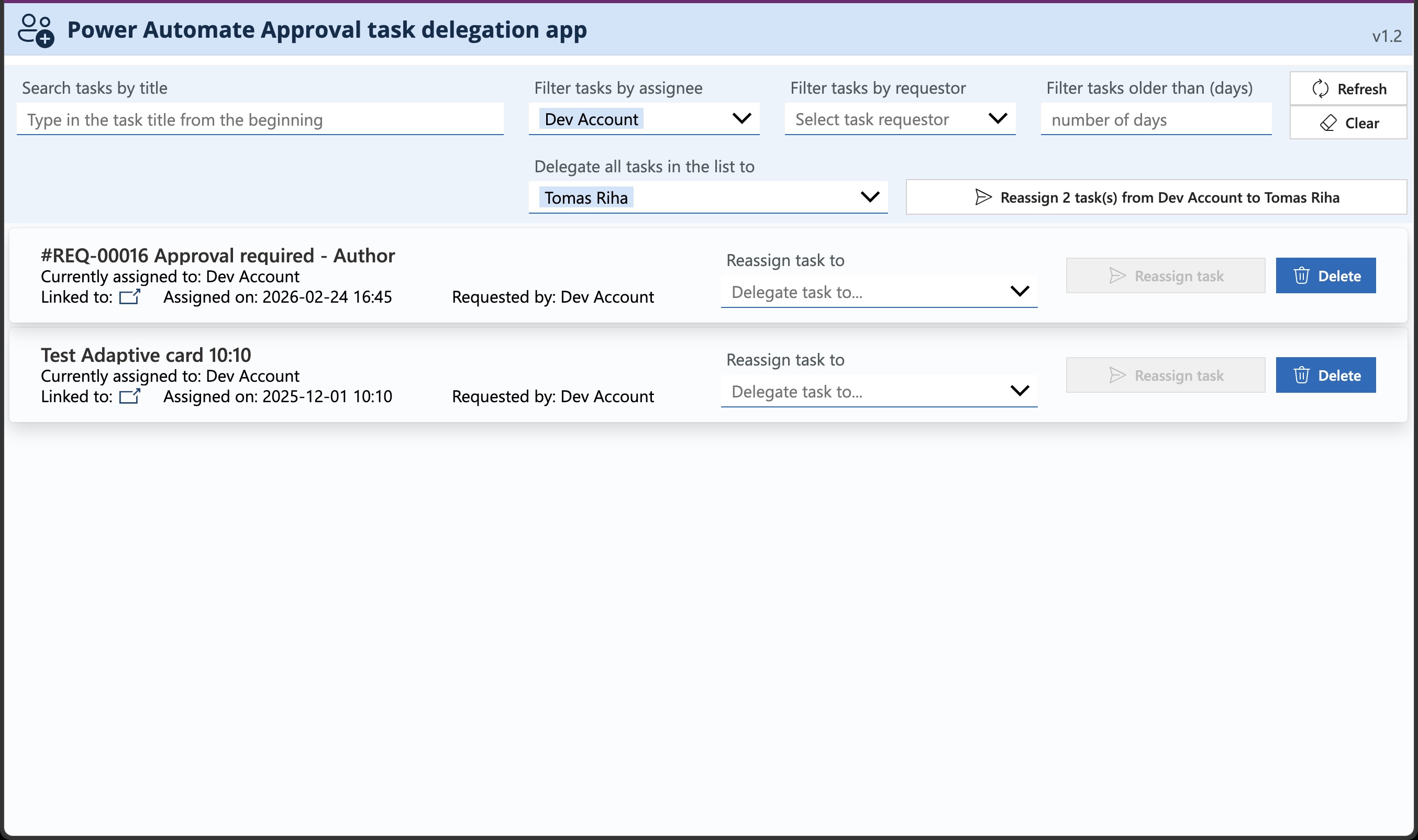
Batch delegation — filtered by assignee with Delegate all tasks in the list to Tomas Riha and Reassign 2 tasks button
Batch delegation
The Power Automate delegation flow showing all steps including task reassignment, SharePoint permission updates, and notifications
The delegation flow

A complete solution,
not a workaround

Built specifically to solve the delegation problem every Power Platform team eventually hits — packaged so you can have it running in your environment the same day.

  • Complete Power Apps solution — task overview and delegation, fully tested and production-ready
  • Power Automate flow — covers the full reassignment including permissions and roles on linked items
  • Three notification channels — email, Teams adaptive card, and Teams task follow-up
  • Setup guide — step-by-step PDF for import and configuration
  • Unmanaged solution — customise colours, layout, and branding to fit your company guidelines
  • Free lifetime updates — all future fixes and improvements included
// Prerequisites

Power Apps premium licence  ·  System Customizer role on the target Power Platform environment

// Deployment process

From download
to live in under
an hour

  • 01Download the unmanaged solution package from your order
  • 02Import the solution into your Power Platform environment
  • 03Configure connections for the Power Automate flows
  • 04Grant System Customizer role to users who'll run the app
  • 05Open the app and start delegating tasks immediately

Power Apps Premium · Dataverse · Power Platform

One purchase.
Lifetime access.

Pick the licence that fits your use case. All paid licences include the full solution, documentation, and free updates forever.

Demo
Free
Try the app before you commit — limited functionality, not for production use.
Try the Demo
  • Task delegation app (limited)
  • Setup guide & docs
  • Production use
  • Multiple environments
  • Client / team use
  • Lifetime updates
Not for production use
Pro
$79
For individuals managing delegation in their own organisation.
Buy Pro
  • Full-featured app
  • Setup guide & docs
  • Lifetime updates
  • Multiple environments
  • Client / team use
Single use · 1 environment · 1 user
Consultant
$149
For consultants and agencies deploying for client organisations.
Buy Consultant
  • Full-featured app
  • Setup guide & docs
  • Lifetime updates
  • Multiple environments
  • Unlimited client use
  • Team / multi-user
Unlimited client projects

Need help with setup or custom adjustments? Book a consulting session →

Common questions,
straight answers

Who can use this application?
Any user with a Power Apps premium licence who holds the System Customizer role on the Power Platform environment where the app is deployed.
What tasks can the app delegate?
The application can reassign any approval task in the environment where it's deployed. Because it's a Power Apps solution, it only has access to tasks in the same environment — to manage tasks in other environments, deploy the app there too.
Does the app delegate tasks automatically?
No — the app is designed for manual delegation of existing tasks. For automatic delegation of newly created tasks (e.g. based on out-of-office status), implement that logic directly in your flows.
Will the app manage permissions on the linked item?
Yes. The flow assigns permissions to the linked SharePoint item or document if it's referenced in the 'Item link' field. If the link uses a non-standard URL format, you may need to adjust the flow logic.
How will the new approver know they received the task?
The reassignment process sends an email notification, posts a Teams adaptive card, and triggers a Teams task follow-up — three channels to make sure the new approver is aware and can act immediately.
Can I change the colours or layout of the app?
Yes. The solution is distributed as an unmanaged solution, so you can customise it however you like — change the colour theme, add your company logo, or rearrange the layout to match your guidelines.
Can I use it with the Approval Process template?
Yes — the application was tested on approval processes built with the Power Automate Approval Process template solution and works seamlessly with it.
Can the Consultant licence be used on client projects?
Yes — the Consultant licence allows unlimited deployment across client organisations with no restriction on the number of projects or environments.

Keep your processes
running no matter what

Don't let a holiday or sick day bring your approval processes to a standstill. Try the demo free, or get the full solution and start delegating today.

// by Workappholics  ·  Power Apps · Power Automate · Dataverse